
Update
Say hello to the new review experience
We've rebuilt the GoVisually review experience from the ground up — faster, cleaner, and packed with new tools to help you and your team get to approval quicker. Here's what's new.
A faster, smoother review canvas
- Rebuilt viewer for images, multi-page PDFs, and video — everything loads and renders more crisply, including high-resolution (HiDPI) display for sharp images at any zoom.
- Effortless pan and zoom — drag to pan, pinch on a trackpad, or Ctrl/Cmd + scroll to zoom right around your cursor.
- Smart view controls — fit to screen, fit to width, or jump to 100% / original size in one click. Teams and projects can set a default zoom and alignment so files always open the way you want.
- Light and dark mode — switch the whole review interface to suit your environment.
Better commenting and markup
- Three annotation tools — drop a pin, draw a box around a region, or point with an arrow to mark exactly what you mean.
- Rich-text comments with bold, italics, lists, and links, plus file attachments so you can add supporting references right in the thread.
- Threaded replies keep conversations organized, and emoji reactions (👍 ❤️ 👏 👀 🎉 😊) make it quick to acknowledge feedback without adding noise.
- Resolve and reopen comments to track what's been actioned.
- @mentions to loop in the right teammate.
✨ New: Comment directly on PDF text
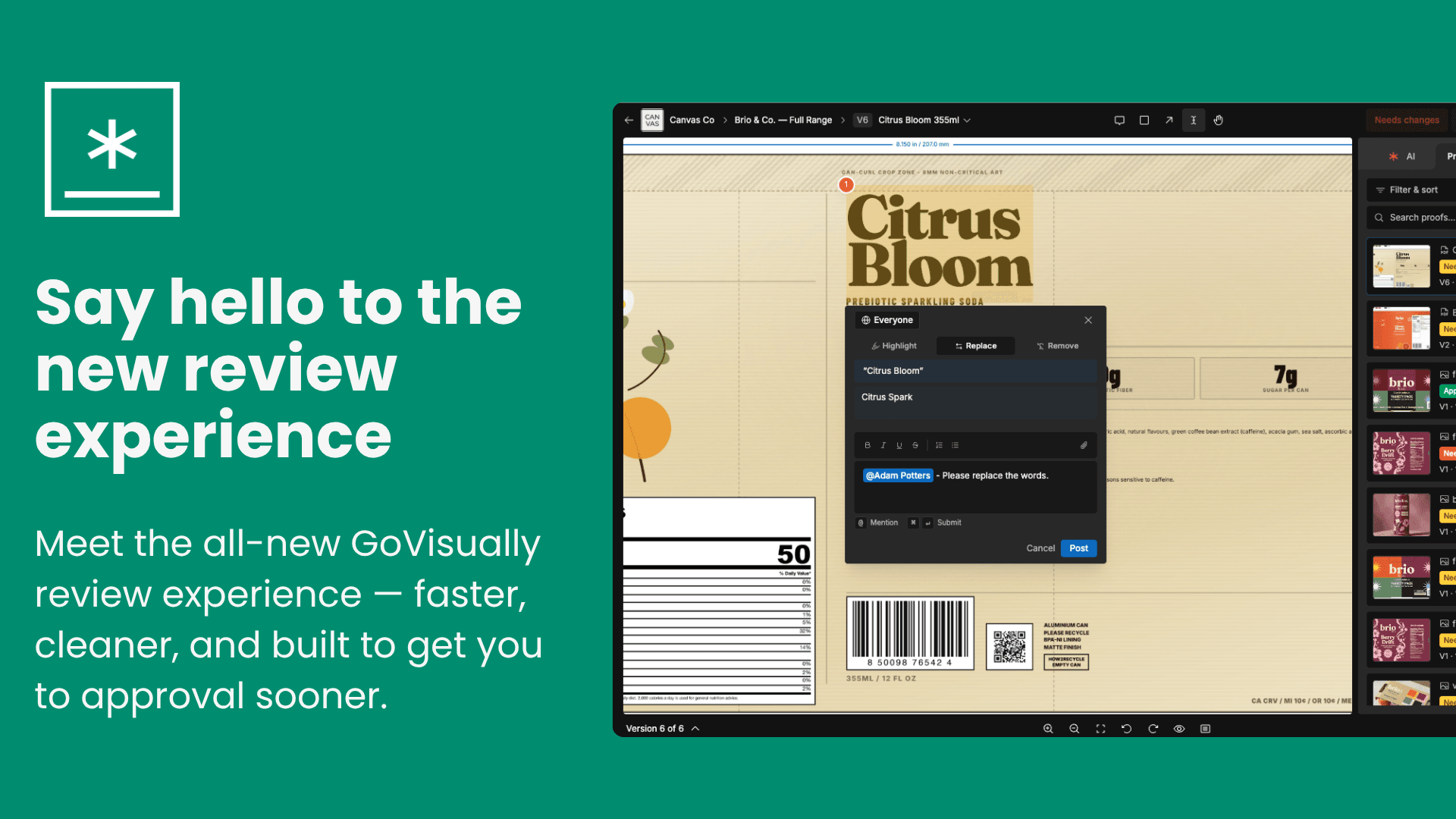
Reviewing copy on a PDF is now as simple as selecting the text — no more dropping a pin and describing which words you mean. Just highlight the text you want to comment on and choose how to mark it up:
- Highlight — call attention to a word, line, or paragraph without changing it.
- Replace — suggest new wording. Your original text and the proposed replacement appear side by side (original in red, suggestion in green) so the change is crystal clear.
- Remove — mark text for deletion with a clean strike-through.
Each selection becomes a comment in its own right, so your text edits live right alongside the conversation and are easy to track, reply to, and resolve. GoVisually even shows you how much of a PDF contains selectable text, so you always know what you can mark up.
A smarter sidebar
- Comments tab with filtering by all / unresolved / resolved, plus per-page filtering on PDFs.
- Proofs tab to jump between designs in a project, with filter and sort by status, name, date, or section.
- AI and Info tabs for analysis results and project details — and if your team has custom fields enabled, they'll appear right in the Info panel so all your project context is in one place.
- The sidebar is resizable and remembers your layout between visits.
🤖 AI-powered analysis
- AI playbooks run automated checks on your designs and surface the results right in the review sidebar.
- Print readiness checks help you catch print issues before they cost you.
- GIA, your AI assistant, is available in-context to discuss a design — and now remembers your conversation history so you can pick up where you left off.
A smarter sidebar
- Comments tab with filtering by all / unresolved / resolved, plus per-page filtering on PDFs.
- Proofs tab to jump between designs in a project, with filter and sort by status, name, date, or section.
- AI and Info tabs for analysis results and project details.
- The sidebar is resizable and remembers your layout between visits.
Clearer approvals and reviewer workflow
- One-click Approve or Needs changes (with a comment).
- See everyone's review status at a glance, send reminders to pending reviewers, and finalize a proof when it's signed off.
- A streamlined flow for external and anonymous reviewers so guests can give feedback without friction.
Video review
- Custom video controls with play/pause, scrubbing, speed, volume, and loop — comments stay tied to the right moment on the timeline.
Beyond review
- Redesigned project dashboard that matches the new review experience.
- Refreshed settings across team, members, integrations, security/SSO, watermarks, custom fields, audit logs, and billing — cleaner layouts and faster loading.
Plus lots of polish
- Full mobile and tablet support for reviewing on the go.
- Numerous performance, stability, and UI refinements throughout.